
AI Alert Triage: Reducing False Positives & Analyst Fatigue
Read More



What should reach an analyst first: a high-severity alert tied to a test system, or a lower-severity event involving a privileged account and a critical application?
The queue does not answer that question. It presents alerts in the order they arrive, with severity labels assigned by individual security tools. Analysts then open records, gather context, remove duplicates, and decide which procedure applies. As volume increases, those manual decisions create inconsistent priorities and uneven case handling.
Incident triage automation brings structure to that first decision. It helps the SOC determine which activity needs immediate attention, which cases require further review, and which events have enough evidence for closure. The triage stage establishes priority and routing before deeper investigation begins, giving analysts the right work in the right order with evidence supporting each decision.
Incident triage is the first formal decision point in the SOC. It evaluates an incoming security event to set its priority, assign ownership, and determine the correct handling path.
The first-pass decision answers a defined set of questions:
The answers produce an initial disposition. Benign activity leaves the active queue with a documented rationale. Uncertain findings move to additional review. Credible threats enter the appropriate investigation or response workflow.
Triage concludes with a clear priority, owner, and next step. The investigation that follows establishes scope, root cause, and business impact.
Manual triage makes analysts repeat the same work across thousands of notifications. They move between tools, collect basic context, compare account and asset details, search for related activity, and decide which procedure applies before the investigation begins.
Severity labels come from the source product, not from the organization’s business context. A critical alert tied to a test asset can rank above a lower-severity event involving a privileged account or production system. On the contrary, analysts must pull together identity, endpoint, cloud, threat intelligence, and internal records to determine which event deserves attention first.
Without a standard sequence, alert priority depends too heavily on who handles the case and which sources they check first. The SOC needs a consistent way to assemble context and set the handling path before investigation begins.
Automated triage moves each event through four distinct stages. These stages create a consistent record before deeper analysis begins, turning a raw security notification into a prioritized case.
The platform receives notifications from connected SIEM, EDR, identity and access management, email security, cloud security, vulnerability management, and other security tools. Normalization converts different vendor formats into a standard structure. Common fields such as user, host, IP address, indicator, timestamp, and source become easier to compare across systems.
The intake layer also identifies duplicates and related activity. Ten notifications associated with the same endpoint, account, and time window belong in one coordinated case rather than ten separate analyst queues.
Security telemetry provides only the starting point. Enrichment connects the source record with the information required to interpret its importance.
Relevant context includes:
Consider a privileged login from an unfamiliar location. Identity records confirm the account and its access level. Endpoint data links the activity to a managed device. An approved travel request explains the location. Together, those records support a more accurate priority than the source severity label alone.
Low-code playbooks execute checks that follow established rules. The procedure validates required fields, queries connected systems, compares indicators with approved lists, applies prioritization criteria, and determines the correct route.
Deterministic logic fits repeatable work because the same inputs produce the same action. A missing required field triggers an exception path. A known test account follows the approved handling procedure.
Defined logic prevents unauthorized actions. Approval gates also keep disruptive actions under human control. Containment and other business-impacting steps remain on hold until the designated reviewer authorizes them.
The triage process ends with a documented disposition, assigned owner, and defined next step. Routine benign activity closes with supporting evidence, uncertain findings move to analyst review, and credible threats enter the appropriate investigation and response workflow.
Assignment rules direct the case to the appropriate team based on severity, business unit, geography, client, or use case. Case management retains the original record, enrichment results, completed checks, routing decisions, approvals, and analyst changes in one record.
Investigators receive a complete starting point rather than a notification with no operational history.
Triage decides which activity deserves attention and where it goes next. Investigation determines what happened, how far the activity reached, what it affected, and which response fits the situation.
| Incident triage | Incident investigation |
| Validates the incoming event | Tests explanations against additional information |
| Establishes initial priority | Confirms scope and business impact |
| Groups related records | Builds a detailed timeline |
| Selects the handling path | Determines the response strategy |
| Assigns ownership | Coordinates investigation and remediation |
A clean handoff connects the two stages without merging their responsibilities.
Triage prepares the case and makes the first routing decision. Investigation expands the inquiry, resolves remaining uncertainty, and establishes a defensible verdict. Treating every incoming event as a full investigation wastes analyst time, similarly, treating triage as a complete investigation creates shallow conclusions.
Defined logic gives the SOC a consistent way to handle conditions it already understands. Some cases still lack context, contain contradictory findings, or involve activity outside an established procedure. Agentic AI helps determine what requires further examination before the SOC reaches a well-supported triage decision.
The agent reviews the available case evidence and isolates the gaps that prevent a reliable disposition. It highlights conflicting findings, missing context, and assumptions that still require validation.
For example, in a case where endpoint activity aligns with normal behavior, but identity records show an unexpected privilege change. The agent surfaces the inconsistency and directs the inquiry toward the checks needed to resolve it.
The agent turns unresolved questions into a first-pass investigation plan. The plan outlines what to check, which sources hold the relevant evidence, and the order in which the checks should run.
Configured runbooks, SOC procedures, internal policies, and available case context shape the plan. Analysts receive a clear line of inquiry instead of defining every step from the beginning.
After the required checks return, the agent brings the findings together and recommends closure, further review, or escalation. The recommendation identifies the evidence behind the decision, points out any remaining uncertainty, and explains why the proposed handling path fits the case.
Analysts receive a reasoned assessment they can review, challenge, or extend. The decision rests on the available evidence rather than an unexplained severity score or summary.
As new information enters the case, the agent updates the working assessment and identifies the next unresolved question. Analysts see what has already been established, what still needs attention, and where their judgment matters.
Agentic AI supports investigation planning, evidence synthesis, and first-pass judgment. Playbooks execute approved steps, while analysts retain authority over exceptions, unclear conclusions, and disruptive response actions.
Reducing false positives starts with stronger validation. The SOC needs enough context to explain why an event belongs outside the active queue.
Weak filtering often relies on a single condition, such as an allowlist match, a low reputation score, or a vendor-assigned severity. Those checks help, but they do not establish the full meaning of the activity. Reliable triage considers several forms of evidence before closing the record.
Four practices support accurate reduction:
Every automated closure needs a clear reason and a traceable record of the evidence behind it. Security leaders should review those decisions regularly and adjust the criteria when systems, procedures, or threat patterns change.
At enterprise scale, every alert needs to follow a consistent path, regardless of where it originated or who handles it first. Swimlane Turbine provides the orchestration layer that keeps the triage process connected across the security stack.
Enterprise triage combines high-volume processing, repeatable workflow, agentic reasoning, and analyst judgment. High-volume records are narrowed before deeper review. Low-code playbooks handle consistent checks, enrichment, grouping, prioritization, and routing. Analysts focus on exceptions and decisions with greater operational impact.
Turbine coordinates these methods, so each type of work follows the best-suited process.
Hero AI distributes analysis across agents designed for specific parts of the inquiry.
Each agent contributes a distinct output to the triage decision rather than placing every form of analysis on one general model.
The Investigation and Response Agent converts an approved investigation or remediation plan into an executable Turbine playbook.
Deterministic workflows then enforce permissions, apply approval gates, carry out authorized actions, manage failures and exceptions, and record each step. Security teams define the level of authority for each use case, with sensitive or disruptive actions reserved for human approval.
The workflow, rather than the recommendation alone, determines what proceeds into execution.
Enterprises and MSSPs need common operating standards without forcing every business unit or client into the same workflow.
Turbine supports shared triage patterns while retaining environment-specific integrations, context, agent instructions, assignment rules, approval paths, and case structures. Teams gain consistency in how cases move through triage while preserving the differences that affect priority, ownership, and response.
Triage quality determines what the SOC investigates, what it closes, and what it risks overlooking. When that first decision rests on incomplete context or inconsistent judgment, the effects carry into every stage that follows.
Security leaders should treat triage as an operating discipline, not a queue-management task. Clear procedures, reliable context, controlled automation, and accountable human review create the conditions for faster decisions without weakening confidence in the outcome.
Swimlane Turbine supports that discipline by connecting the reasoning, workflow, evidence, and controls behind each decision. The goal is a triage process the SOC can trust at scale, explain under review, and improve as its environment changes.
Bring a current triage workflow to a Swimlane Turbine session and see how the platform collects context, applies decision logic, routes exceptions, and preserves the evidence behind every disposition. Request a Triage Automation Walkthrough.

Bring a live triage workflow to a Swimlane Turbine session. See how the platform collects context, applies decision logic, routes exceptions, and preserves the evidence behind every disposition, before a single analyst opens the case.
Start with a documented triage procedure, clear ownership, reliable access to supporting data, and defined criteria for closure, escalation, and exception handling. Automation will reproduce gaps in the existing process unless the team first agrees on how to handle each use case.
Run the automated workflow alongside analysts and compare its priorities, dispositions, and routing decisions with human outcomes. Review disagreements, reopened cases, missing evidence, and incorrect recommendations before expanding the workflow’s authority.
The workflow should record the failure and route the case through a defined exception path. Missing data should never be treated as evidence that an event is benign, especially when the unavailable source affects priority or disposition.
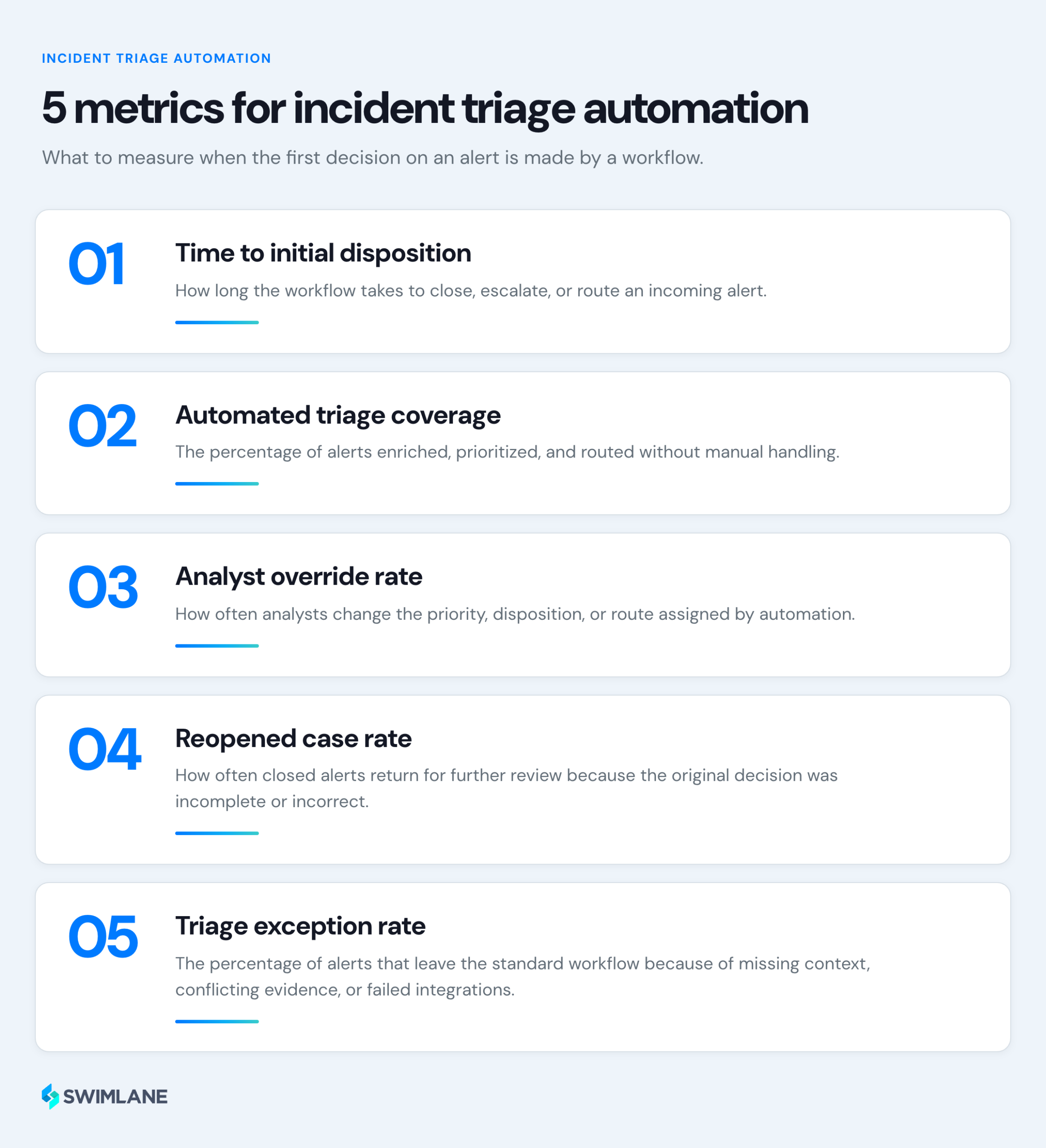
Review triage criteria whenever tools, business processes, threat patterns, or SOC procedures change. Regularly check overrides, exception rates, incorrect closures, workflow failures, and reopened cases to see where playbooks, agent instructions, or approval rules need adjustment.

 English English
  Français
 Deutsch
 日本語
日本語
 한국어
한국어
 Português
 Español