Jul 18, 2023
Why Weedmaps Chose Swimlane for DevSecOps Automation
Read More




If your security operations center feels busy all the time yet still struggles to keep pace, the issue is rarely a lack of effort. More often, the problem is the workflow itself. Alerts arrive from everywhere, context lives in too many systems, response steps depend on individual habits and memory, while hand-offs take longer than they should. Also, documentation gets written at the end when everyone is already moving to the next fire. Automating your SOC fixes that reality.
At its simplest, SOC automation is about turning repeatable security work into consistent execution. Instead of having analysts manually gather context, copy indicators between tools, open tickets, notify stakeholders, and run the same checks repeatedly, you define the workflow once and let the system carry it out. Done well, it reduces response friction, improves consistency, and makes the SOC more predictable under pressure.
SOC automation is the use of orchestrated workflows, playbooks, and AI-assisted actions to execute common security operations tasks with minimal manual effort, while preserving governance and analyst oversight.
That definition matters because it clarifies what SOC automation is not. It is not another detection tool. It is not a replacement for your SIEM or EDR. It is the operating layer that connects those tools, gathers the right context, routes work to the right people, triggers approved actions, and records what happened along the way. It helps your SOC behave like a system rather than a collection of screens.
A good SOC automation program focuses on the work that repeats daily:
When people say “we need SOC automation,” they usually mean “we need less manual glue work and more consistent response.”
SOC work has changed. Detection coverage has expanded, environments have become hybrid, and attacker behavior is faster and more coordinated. Meanwhile, SOC staffing rarely grows at the same rate as alert volume. The result is familiar:
Automating your SOC matters because it addresses the operational bottleneck, not the detection capability. It improves the security aspect that often determines impact, i.e., how quickly you can understand what is happening, choose the right action, execute it safely, and document it properly.
SOC automation delivers value in multiple layers. Some benefits are immediate, others show up as process quality improves.
When enrichment, correlation, and initial routing happen automatically, analysts start investigations with context already assembled. Response steps run sooner, and fewer incidents stall in queues.
When response is playbook-driven, the SOC is less dependent on tribal knowledge. You get standard evidence capture, standard routing, and standard containment sequences. That matters most during high-pressure incidents, when humans are more likely to skip steps.
Analysts did not join the SOC to copy indicators between tabs. They joined to investigate and make decisions. Automating the SOC removes repetitive actions and leaves analysts with work that requires judgment. That improves throughput and makes roles more sustainable.
Automation makes evidence capture and action logging natural, not an afterthought. When workflows automatically record who did what, when, and why, audits become less painful and leadership reporting becomes more credible.
When workflows run through a centralized automation layer, you can measure the SOC like an operation. You can identify bottlenecks, see where approvals delay response, track the volume by category, and show improvement over time.
Pro tip: Start with one high-volume workflow (phishing or alert triage) and track two metrics before and after, like time-to-triage and cases closed per analyst. Once you can prove a clear gain, expand the same playbook pattern to the next use case.
A common mistake is thinking automation starts with containment actions. Swift wins, in most cases, come from improving triage and case handling.
A practical way to choose what to automate is to separate tasks by risk and repeatability.
These are steps that are consistent and rarely controversial.
Examples:
These are actions that can be automated but should include conditions, approvals, or thresholds.
Examples:
Some work should remain analyst-driven, but automation can still assemble evidence and prepare next steps.
Examples:
It succeeds when you start where confidence is high and expand based on measured impact.
Most SOC automation programs converge on a core set of use cases because they are repeatable and expensive when handled manually.
Enrichment is where automation earns trust quickly. Instead of asking analysts to hunt for basic context, automation can provide it at the start.
This changes the analyst experience. Instead of starting with “what is this,” they start with “what does it mean and what should we do next.”
Phishing remains high-volume and operationally draining without automation. A strong workflow typically includes:
Phishing automation is not only about speed. It is about consistency and reducing the number of phishing events that quietly escalate into larger incidents.
Even teams with strong detection can fail on coordination. Case management becomes a major automation target because it connects response steps across people and teams.
When case management is automated, incidents are easier to transfer between shifts, review, and report on.
EDR detections often require fast verification and controlled containment. Automating it helps collect host context, validate related signals, and coordinate approved actions.
A practical workflow can:
Identity events sit at the intersection of security and IT operations. Automating identity response workflows reduce friction by turning identity signals into structured actions. Identity response is where governance is critical. Automation improves both speed and defensibility when it is built with clear thresholds and approvals in place.
Cloud alerts can be noisy and hard to contextualize quickly. Automation helps teams move from “alert received” to “ownership and action” faster by:
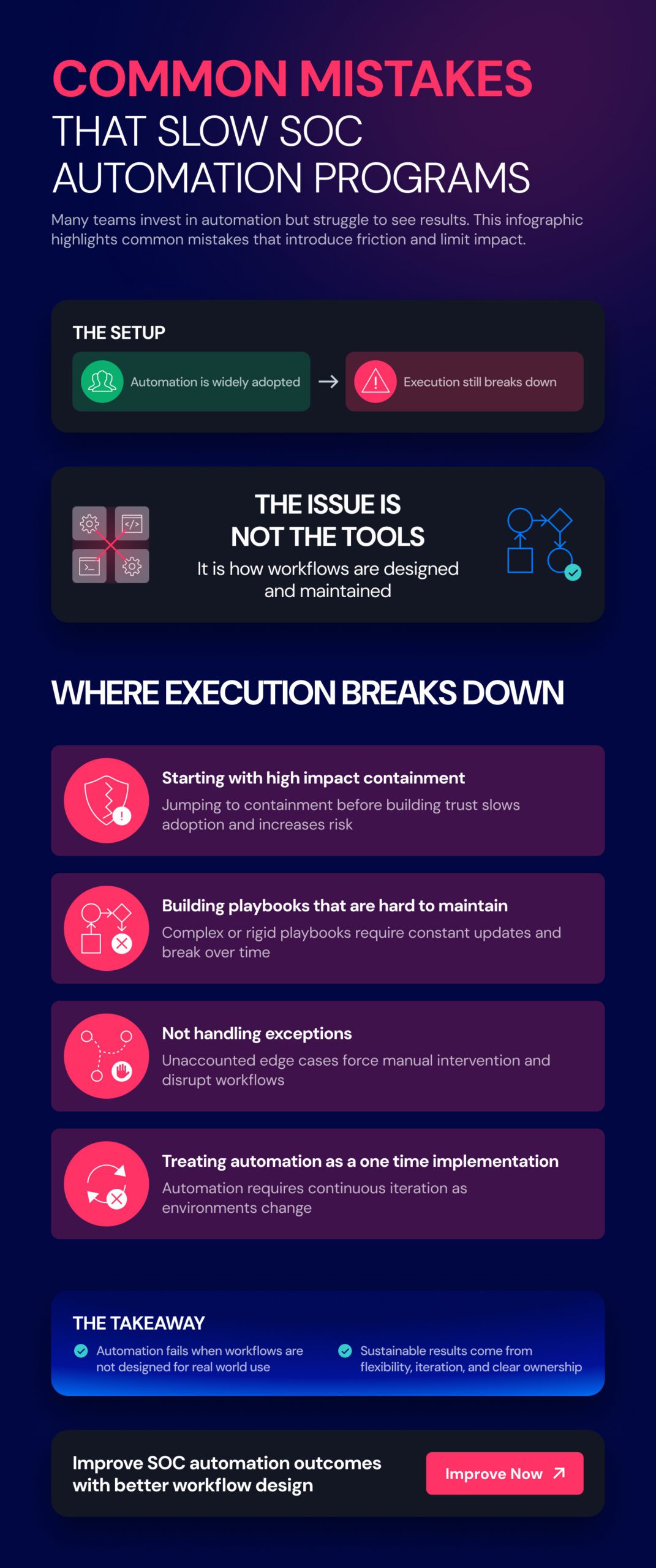
SOC automation is not a single feature. It is an architecture that connects signals, tools, workflows, people, and governance.
A strong SOC automation architecture includes six layers.

This is how alerts and events enter your automation workflows. Sources typically include SIEM, EDR/XDR, email security, cloud security, IAM, threat intel, and user-reported events.
The key requirement is normalization. Even if alerts come from different systems, the automation layer needs consistent fields like severity, entity, environment, category, and confidence. Without that, workflows become brittle and hard to maintain.
The integration and orchestration layer connects to your tools to gather context and take action. Orchestration matters because SOC work is rarely confined to a single tool. Most response sequences cross multiple systems.
If integrations are weak, automation becomes a patchwork of scripts. If orchestration is strong, automation becomes an operating model.
This is where your SOC logic lives. Playbooks define what should happen when a given signal occurs.
Swimlane Turbine helps teams connect tools, run workflows, and move SOC work forward with more speed and control.
Even if you use external ticketing, the SOC needs structured case coordination. Case management is where incidents become trackable work rather than an ad hoc effort.
This layer should support:
Action logging and timeline reconstruction
Automation without governance is risky. Governance without automation is slow. This layer ensures response is safe, defensible, and consistent.
Governance includes:
Measurement and reporting is where automation becomes measurable and improvable. Good reporting supports executive visibility by connecting SOC work to operational resilience, risk management, and cost control.
Traditional SOC automation relies on rules and defined playbooks. That still forms the backbone of reliable execution. Agentic AI adds value when it can assist with routine, multi-step work inside defined guardrails.
Agentic AI in security operations typically helps with:
The right approach is not “AI decides.” The right approach is “AI assists execution and documentation within governed workflows.” That is how you improve speed without losing control.
Pro tip: As the first steps of a larger roll out, start by applying agentic AI to investigation, triage, documentation, and case summaries before moving it into response actions. This builds trust with analysts, improves reporting quality, and keeps critical decisions firmly under human control while you refine guardrails.
Many SOCs start automation with scripts, small workflow automations, or tool-specific playbooks. That can work early. It becomes harder when the SOC needs to scale, integrate more tools, support more use cases, and maintain governance.
Swimlane provides an AI-driven security automation and orchestration approach through Swimlane Turbine, designed for SOC automation at enterprise scale. That means you can orchestrate workflows across your tool ecosystem, build and evolve low-code playbooks, and apply agentic AI where it improves execution and documentation.
What this looks like in a real SOC is not a single magic workflow. It is a steady shift:
Reporting reflects real work and real outcomes, not manual summaries
SOC automation is how a SOC becomes reliable under pressure. It reduces manual glue work, standardizes response, and turns detection signals into consistent action across tools and teams. The payoff is not just a faster response. It is better process quality, better audit readiness, clearer reporting, and a SOC that can scale without burning people out.
If your SOC has outgrown disconnected automations, Swimlane helps you connect tools, run workflows with more control, and keep response work moving as the environment grows. Swimlane Turbine reduces manual handoffs and gives teams a stronger way to manage automation across the SOC.
Explore how Swimlane Turbine supports SOC automation and agentic AI-assisted execution at enterprise scale.
SOC automation uses workflows and playbooks to handle repeatable SOC tasks automatically, such as enrichment, triage, routing, containment steps with approvals, and documentation. It reduces manual effort while keeping analysts in control of key decisions.
Most SOCs start with alert enrichment, case creation, and routing because these tasks are high-volume and low-risk. Once those are stable, teams expand to response actions with guardrails and approvals.
Agentic AI can support routine multi-step SOC tasks inside defined guardrails, such as summarizing incidents, proposing next actions, running standard investigation sequences, and assisting with documentation. Human oversight remains important for high-impact decisions.
Swimlane uses Turbine to connect tools, run workflows, and help SOC teams handle routine work with AI inside clear guardrails.

Stop the manual glue work and start turning repeatable security tasks into consistent execution with Swimlane Turbine.

 English English
  Français
 Deutsch
 日本語
日本語
 한국어
한국어
 Português
 Español